If you have ever searched for a way to print cheques, you have probably come across two options: dedicated cheque printing software and Excel templates.
Excel seems like an easy solution. Everyone has it. It is free. Why not just use a template?
The short answer? It is risky.
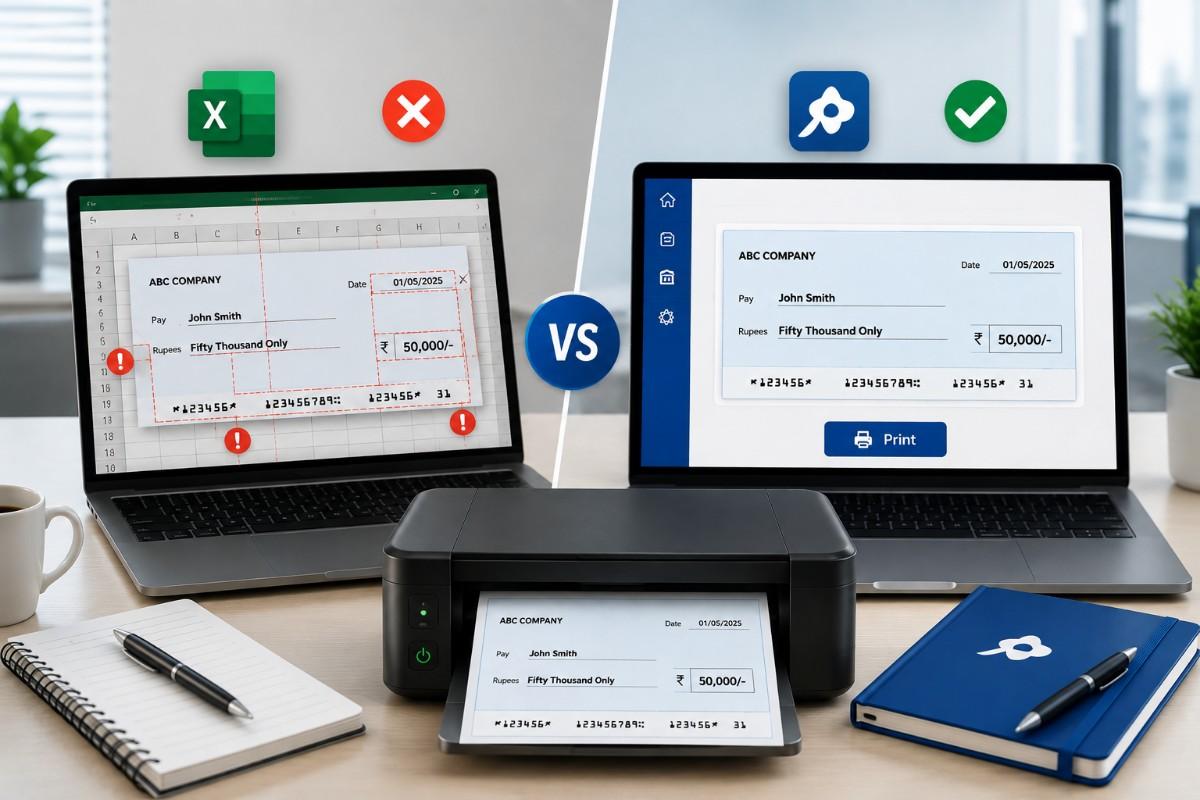
While Excel templates can technically print cheques, they come with serious problems that can cost you time, money, and trust. Let me show you why cheque printing software vs Excel templates is not even a close comparison.
Why Excel Templates Seem Like a Good Idea
Let me be honest. Excel templates are tempting.
- They are free
- You already have Excel installed
- You can find templates online in seconds
- It looks simple
But here is the problem. What looks simple on screen turns into a nightmare at the printer.
The Hidden Risks of Excel Cheque Templates
1. Alignment Never Holds
This is the biggest problem.
An Excel cheque template looks perfect on your screen. You enter the payee name, amount, and date. Everything lines up.
Then you print.
The payee line lands a quarter inch off. The amount shifts to the right. The date prints outside the box.
Every time you open the file on a different computer or update Excel, the alignment shifts. You end up wasting cheque leaves and losing time fixing the same problem over and over.
2. MICR Encoding Gets Ignored
The magnetic ink line at the bottom of a cheque follows strict formatting rules. This is how banks process cheques automatically.
A generic Excel template does not encode this correctly. If your MICR line is off, your cheque may not scan at the bank at all. Even a small shift can cause a rejected deposit.
3. Typos Slip Through
When you use Excel, you retype the amount in words and digits by hand every single time. One mismatch can void the cheque.
Manual entry makes mistakes easy to miss. And when a cheque bounces because of a typo, you pay the price.
4. Version Chaos Spreads
Someone saves a copy of your template. Someone else edits the address and emails it around. Soon three versions float through your team. Nobody knows which file is current.
When you finally print, you discover the wrong version is missing a field or uses the wrong layout.
5. No Record Survives
Excel templates print a cheque and forget it. There is no automatic log of cheque number, payee, or date.
When month-end reconciliation arrives, you are guessing. You have to manually track every payment. And if you lose your spreadsheet, you lose everything.
Comparison Table: Excel Templates vs Cheque Printing Software
| FactorExcel Templates Check | ||
|---|---|---|
| Alignment | Manual adjustment needed every time | ✅ Pre-configured, prints correctly every time |
| MICR Encoding | Not handled automatically | ✅ Handled correctly |
| Manual Entry Errors | High risk – retype every time | ✅ Enter once, prints correctly |
| Record Keeping | Manual tracking required | ✅ Automatic log of every cheque |
| Version Control | Scattered files, confusion | ✅ Single source of truth |
| Security | No controls | ✅ 100% offline, encrypted |
| Time Per Cheque | 5-10 minutes (with adjustments) | ✅ 60 seconds |
| Cost | Free | ✅ Free to start, Pro at $99/year |
How Cheqaat Solves These Problems
Cheqaat is a modern, offline cheque printing software that eliminates the risks of Excel templates.
| Excel Problem: How Cheqaat Fixes It | |
| Alignment shifts every print. | Pre-configured templates for major banks |
| MICR encoding errors | Handles formatting automatically |
| Typos and manual errors | Enter details once, and it prints correctly. |
| No record keeping | Automatic log of every cheque |
| File version chaos | One source of truth |
| No security controls | 100% offline with encryption |
Step-by-Step: How to Print a Cheque with Cheqaat
- Download and install Cheqaat on your Windows PC
- Select your bank from pre-configured templates
- Enter payee details – name, amount, date
- Click print – alignment handled automatically
- Record saved – every cheque is logged
Why Cheqaat Beats Excel Templates
| FeatureExcel TemplatesCheck | ||
| Pre-configured bank templates | ❌ No – you measure manually. | ✅ Yes |
| Automatic alignment | ❌ No – adjust every time | ✅ Yes |
| MICR encoding | ❌ Not handled | ✅ Yes |
| Bulk printing | ❌ Impossible | ✅ Yes |
| Record keeping | ❌ Manual | ✅ Automatic |
| Searchable history | ❌ No | ✅ Yes |
| PDF export | ❌ No | ✅ Yes |
| Data security | ❌ Unencrypted file | ✅ 100% offline encrypted |
Cheque Printing Software vs Excel Templates: Quick Comparison
| AspectExcel TemplatesCheqaat | ||
| Time per cheque | 5-10 minutes | 60 seconds |
| Alignment issues | Every print | Never |
| Manual errors | High risk | Low risk |
| Record keeping | Manual | Automatic |
| Security | None | Encrypted offline |
Frequently Asked Questions
Can I print cheques from Excel?
Yes, technically you can. But the alignment and manual data entry make it risky and time-consuming.
Is cheque printing software expensive?
Cheqaat is free to start, with a Pro plan at $99/year. The time you save pays for itself.
What is the best free cheque printing software?
Cheqaat is free to start. For businesses that need reliable alignment and record keeping, it is the best option.
Why do Excel templates misalign?
Excel is not designed for precise cheque printing. Different printers, different computers, and different Excel versions all cause alignment shifts.
Is cheque printing software secure?
Yes. Cheqaat is 100% offline and encrypts all data locally. Your financial information never leaves your device.
Final Thoughts
Excel templates are tempting because they are free. But they are not reliable. Alignment issues, manual errors, no record keeping, and security risks make them a dangerous choice for business cheque printing.
Cheque printing software like Cheqaat is designed to solve these problems. It handles alignment automatically, records every cheque, and keeps your data secure.
Stop fighting with Excel templates. Start printing with Cheqaat.
Ready to print professional cheques without the hassle? Download Cheqaat for free today and print your first cheque in under 60 seconds. Need more features? View our pricing plans.
Check out our step-by-step guide to printing cheques for more tips.
Built by TROJAN IT SOLUTION PVT LTD